Initial import
Bulk Loader performs fast initial data imports into a new Dgraph cluster. It's significantly faster than Live Loader for large datasets and is the recommended approach for initial data ingestion.
Use Bulk Loader when:
- Setting up a new Dgraph cluster
- Importing large datasets (GBs to TBs)
- Performance is critical for the initial load
Bulk Loader can only be used with a new cluster. For importing data into an existing cluster, use Live Loader.
Prerequisites
Before running Bulk Loader:
- Start one or more Dgraph Zeros (Alphas will be started later)
- Prepare data files in RDF (
.rdf,.rdf.gz) or JSON (.json,.json.gz) format - Prepare a schema file
Bulk Loader only accepts RDF N-Quad/Triple data or JSON. See data migration for converting other formats.
Quick Start
dgraph bulk \
  --files data.rdf.gz \
  --schema schema.txt \
  --zero localhost:5080 \
  --map_shards 4 \
  --reduce_shards 1
Understanding Shards
Before running Bulk Loader, determine your cluster topology:
--reduce_shards— Set to the number of Alpha groups in your cluster--map_shards— Set equal to or higher than--reduce_shardsfor even distribution
| Cluster Setup | Alpha Groups | --reduce_shards |
|---|---|---|
| 3 Alphas, 3 replicas/group | 1 | 1 |
| 6 Alphas, 3 replicas/group | 2 | 2 |
| 9 Alphas, 3 replicas/group | 3 | 3 |
Basic Usage
dgraph bulk \
  --files ./data.rdf.gz \
  --schema ./schema.txt \
  --zero localhost:5080 \
  --map_shards 4 \
  --reduce_shards 2
Output Structure
Bulk Loader generates p directories in the out folder:
./out
├── 0
│   └── p
│       ├── 000000.vlog
│       ├── 000002.sst
│       └── MANIFEST
└── 1
    └── p
        └── ...
With --reduce_shards=2, two directories are created (./out/0 and ./out/1).
Deploying Output to Cluster
Copy each shard's p directory to the corresponding Alpha group:
- Group 1 (Alpha1, Alpha2, Alpha3) → copy
./out/0/p - Group 2 (Alpha4, Alpha5, Alpha6) → copy
./out/1/p
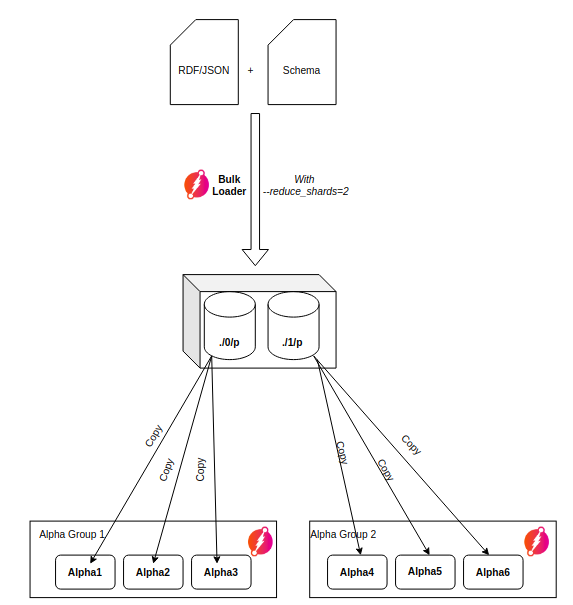
Every Alpha replica in a group must have a copy of the same p directory.
Loading from Cloud Storage
Amazon S3
Set credentials via environment variables or use IAM roles:
| Environment Variable | Description |
|---|---|
AWS_ACCESS_KEY_ID | AWS access key with S3 read permissions |
AWS_SECRET_ACCESS_KEY | AWS secret key |
dgraph bulk \
  --files s3:///bucket/data \
  --schema s3:///bucket/data/schema.txt \
  --zero localhost:5080
IAM Setup
- Create an IAM Role with S3 access
- Attach using Instance Profile (EC2) or IAM roles for service accounts (EKS)
MinIO
| Environment Variable | Description |
|---|---|
MINIO_ACCESS_KEY | MinIO access key |
MINIO_SECRET_KEY | MinIO secret key |
dgraph bulk \
  --files minio://server:port/bucket/data \
  --schema minio://server:port/bucket/data/schema.txt \
  --zero localhost:5080
Deployment Strategies
Small Datasets (< 10 GB)
Let Dgraph stream snapshots between replicas:
- Run Bulk Loader on one server
- Start only the first Alpha replica
- Wait ~1 minute for snapshot creation:
Creating snapshot at index: 30. ReadTs: 4. - Start remaining Alpha replicas — snapshots stream automatically:
Streaming done. Sent 1093470 entries. Waiting for ACK...
Large Datasets (> 10 GB)
Copy p directories directly for faster deployment:
- Run Bulk Loader on one server
- Copy/rsync
pdirectories to all Alpha servers - Start all Alphas simultaneously
- Verify all Alphas create snapshots with matching index values
Predicate Placement
By default, Bulk Loader packs predicates into reduce shards by size, so which group serves a given predicate varies between runs. The --tablet_placement flag pins chosen predicates to specific groups, so the cluster starts with a deterministic, operator-chosen layout.
Create a placement file containing a JSON array of entries:
[
  {"predicate": "payload", "group": 2},
  {"predicate": "friend",  "group": 3, "namespace": 0}
]
| Field | Description |
|---|---|
predicate | Predicate name, without a namespace prefix |
group | Target Alpha group, from 1 to --reduce_shards. Group N's data is written to out/<N-1>/p |
namespace | Optional namespace the predicate belongs to (default: 0) |
Pass the file to the loader:
dgraph bulk \
  --files data.rdf.gz \
  --schema schema.txt \
  --zero localhost:5080 \
  --map_shards 6 \
  --reduce_shards 3 \
  --tablet_placement placement.json
Behavior
- A pinned predicate's data, index, and schema keys are all written to its group's output directory. This includes predicates that appear only in the schema and carry no data in the load.
- Predicates not listed in the file keep the default size-balanced packing. Use
--map_shardsgreater than--reduce_shardsfor this: with equal values every map shard is dedicated to a group and size balancing is disabled (the loader logs a notice). - The loader logs the routing of every pinned predicate, for example
pinned: 0-payload -> map shard 1 -> out/1/p (group 2), and warns after the map phase about pinned predicates that matched nothing in the schema or data — usually a typo in the placement file.
Validation
The loader exits with an error before loading any data if the placement file contains:
- a group below 1 or above
--reduce_shards - duplicate entries for the same namespace and predicate
- reserved (
dgraph.*) predicates — these are always served by group 1 - unknown fields, or a document that isn't a JSON array
- entries for namespaces that can never match when
--force-namespaceis also set
Placement is applied at load time only. Once the cluster is running, Zero's automatic rebalancer (--rebalance_interval, default 8 minutes) may move tablets between groups; set --rebalance_interval=0 on every Zero to disable automatic rebalancing and preserve the layout. /moveTablet can still move tablets at any time.
Multi-tenancy
By default, Bulk Loader preserves namespace information from data files. Without namespace info, data loads into the default namespace.
Force all data into a specific namespace with --force-namespace:
dgraph bulk \
  --files data.rdf.gz \
  --schema schema.txt \
  --zero localhost:5080 \
  --force-namespace 123
Encryption
Loading into Encrypted Cluster
Generate encrypted p directories:
dgraph bulk \
  --files data.rdf.gz \
  --schema schema.txt \
  --zero localhost:5080 \
  --encryption key-file=./encryption.key
Loading Encrypted Exports
Decrypt encrypted export files during import:
# Encrypted input → Encrypted output
dgraph bulk \
  --files encrypted-data.rdf.gz \
  --schema encrypted-schema.txt \
  --zero localhost:5080 \
  --encrypted=true \
  --encryption key-file=./encryption.key

# Encrypted input → Unencrypted output (migration)
dgraph bulk \
  --files encrypted-data.rdf.gz \
  --schema encrypted-schema.txt \
  --zero localhost:5080 \
  --encrypted=true \
  --encrypted_out=false \
  --encryption key-file=./encryption.key
Using HashiCorp Vault:
dgraph bulk \
  --files encrypted-data.rdf.gz \
  --schema encrypted-schema.txt \
  --zero localhost:5080 \
  --encrypted=true \
  --vault addr="http://localhost:8200";enc-field="enc_key";enc-format="raw";path="secret/data/dgraph"
Encryption Flag Combinations
--encrypted | --encryption key-file | Result |
|---|---|---|
| true | not set | Error |
| true | set | Encrypted input → Encrypted output |
| false | not set | Unencrypted input → Unencrypted output |
| false | set | Unencrypted input → Encrypted output |
Performance Tuning
Disable swap space when running Bulk Loader. It's better to reduce memory usage via flags than let swapping slow the process.
Map Phase
Reduce memory usage:
| Flag | Description |
|---|---|
--num_go_routines | Lower = less memory |
--mapoutput_mb | Lower = less memory |
Tip: For large datasets, split RDF files into ~256MB chunks to parallelize gzip decoding.
Reduce Phase
Increase if you have RAM to spare:
| Flag | Description |
|---|---|
--reduce_shards | Higher = more parallelism, more memory |
--map_shards | Higher = better distribution, more memory |
CLI Options Reference
| Flag | Description |
|---|---|
--files, -f | Data file(s) or directory path |
--schema, -s | Schema file path |
--graphql_schema, -g | GraphQL schema file (optional) |
--zero | Dgraph Zero address |
--map_shards | Number of map shards |
--reduce_shards | Number of reduce shards (= Alpha groups) |
--out | Output directory (default: out) |
--tmp | Temp directory (default: tmp) |
--new_uids | Assign new UIDs instead of preserving |
--store_xids | Store XIDs as xid predicate |
--xidmap | Directory for XID→UID mappings |
--format | Force format (rdf or json) |
--force-namespace | Load into specific namespace |
--tablet_placement | JSON file pinning predicates to groups |
--encryption | Encryption key file |
--encrypted | Input files are encrypted |
--encrypted_out | Encrypt output (default: true if key provided) |
--badger compression | Compression: snappy, zstd, or none |
See dgraph bulk CLI reference for the complete list.